Room 6 readings
- Mould risk
- Margin before condensation
- Dew point
- Cold wall temperature
- Indoor temperature
- Indoor humidity

App for Homey Pro
Know when a wall is about to get wet, in degrees rather than a vague warning.
Available v1.1.6
This one fetches nothing from outside. It takes a temperature and humidity sensor you already own, an outdoor temperature, and computes the room's dew point, then the temperature of its coldest wall. What it gives, and no sensor gives alone, is a margin: how many degrees still separate the wall from the moment water condenses on it. A hygrometer reading sixty-five per cent does not say whether that is serious. A margin of one degree does. A widget also gathers every room with a humidity sensor, sorted by risk, without creating a device for each.
View on the Homey App Store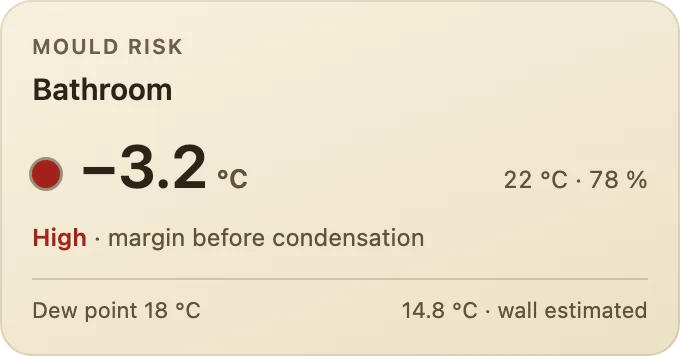
The margin before condensation in large type with the room's temperature and humidity, the risk level, and below them the dew point and the cold wall temperature, measured or estimated.
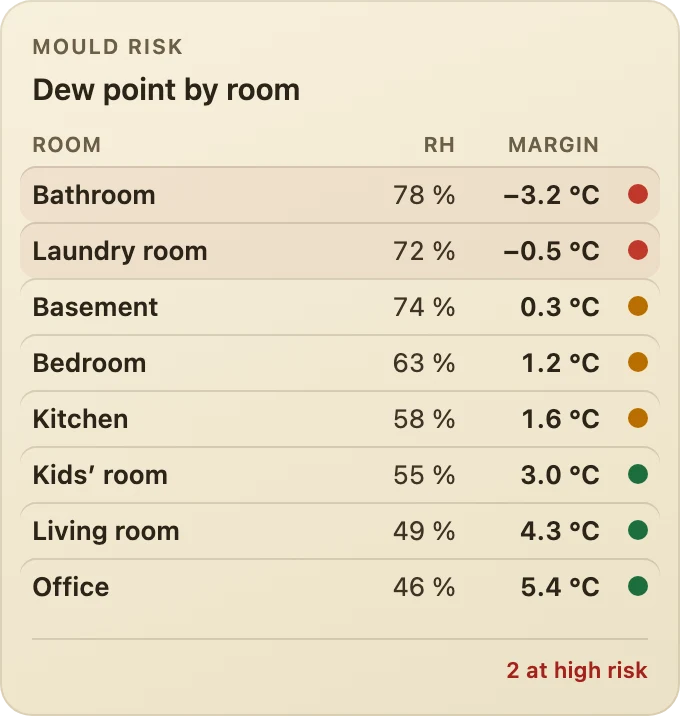
One row per room with a humidity sensor, from the highest risk to the smallest margin: temperature, humidity, dew point, margin and risk. At the foot, the number of rooms at high risk.
Homey writes an automation in three parts: when something happens, and if a condition holds, then do this. Anything on a lighter background, such as radius, is a parameter you set in the Flow. Every condition also exists in its negative form, which Homey flips with one click.
When 2
And 2
Then 1
Dew Point & Mould Guard 1.1.5 adds a dashboard widget that shows all your rooms at once.
The margin before condensation is how many degrees the coldest wall can still cool before water or frost appears on it; at 0 °C or less, the risk is high. The Dew point table shows at a glance which rooms are at risk.
Edit a dashboard, add a widget and choose Dew Point & Mould Guard, then Room or Dew point table. For Room, pick the room from the list; for the table, choose how many rooms to show, or only rooms at risk. Then pick a background. To leave a room out of the table, untick it in the app settings.