Ecojoko meter 6 readings
- Power
- Imported (total)
- Exported (total)
- Today's consumption
- Today's solar surplus
- Today's cost

App for Homey Pro
Make every watt visible
In review v0.4.1
Ecojoko makes a box that reads electricity consumption straight off the meter, no sensor to install. But no official API exists to make it talk to Homey. This app follows the method of a community project for Home Assistant, hence its name, borrowing the API used by the Ecojoko mobile app itself. It tracks live consumption, the day's total and cost, any solar surplus, the Tempo colour where the contract has one, and indoor/outdoor temperature and humidity if the box has the sensor.
View on the Homey App Store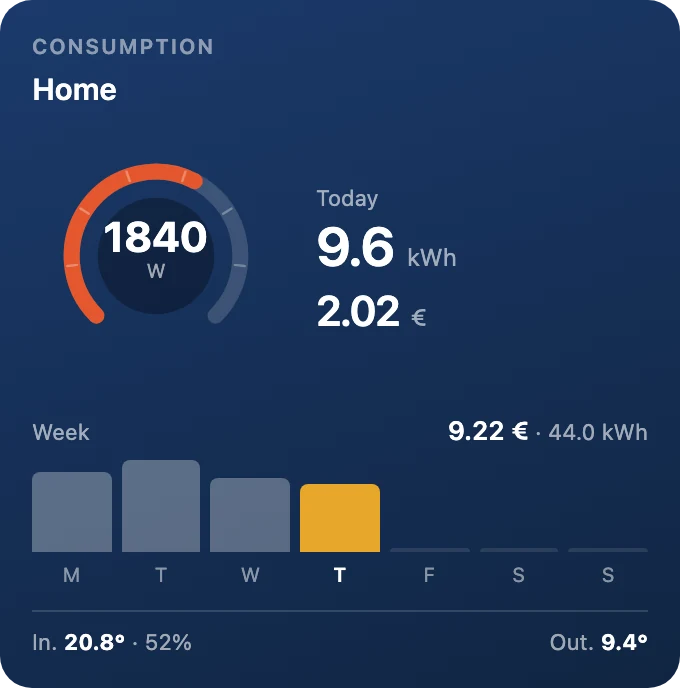
The current power on a green, amber or red dial, today's energy and cost, the solar surplus if there is one, the week as bars, and at the foot the sensor's temperature and humidity.
Homey writes an automation in three parts: when something happens, and if a condition holds, then do this. Anything on a lighter background, such as radius, is a parameter you set in the Flow. Every condition also exists in its negative form, which Homey flips with one click.
When 4
And 4
Then 1
Ecojoko 0.4.1 is a small update focused on the Consumption widget.
Nothing changes in the way the app reads your Ecojoko: devices, Flows and Energy keep working as before.
Add the Consumption widget from your dashboard. In its settings, choose what the tile shows: today's kWh, today's cost, the sensor and the week can each be turned on or off, and the tile adjusts its height to match. Then choose a background: deep blue, slate, plum, forest or sand.
If you have solar panels, the solar surplus appears under today's figures whenever there is one.